Snapveil

Chrome extension · Coming soon to the Chrome Web Store

Screenshot a whole page, point at what matters, hide what's private, and share it. Everything happens in your browser: nothing is uploaded, ever.

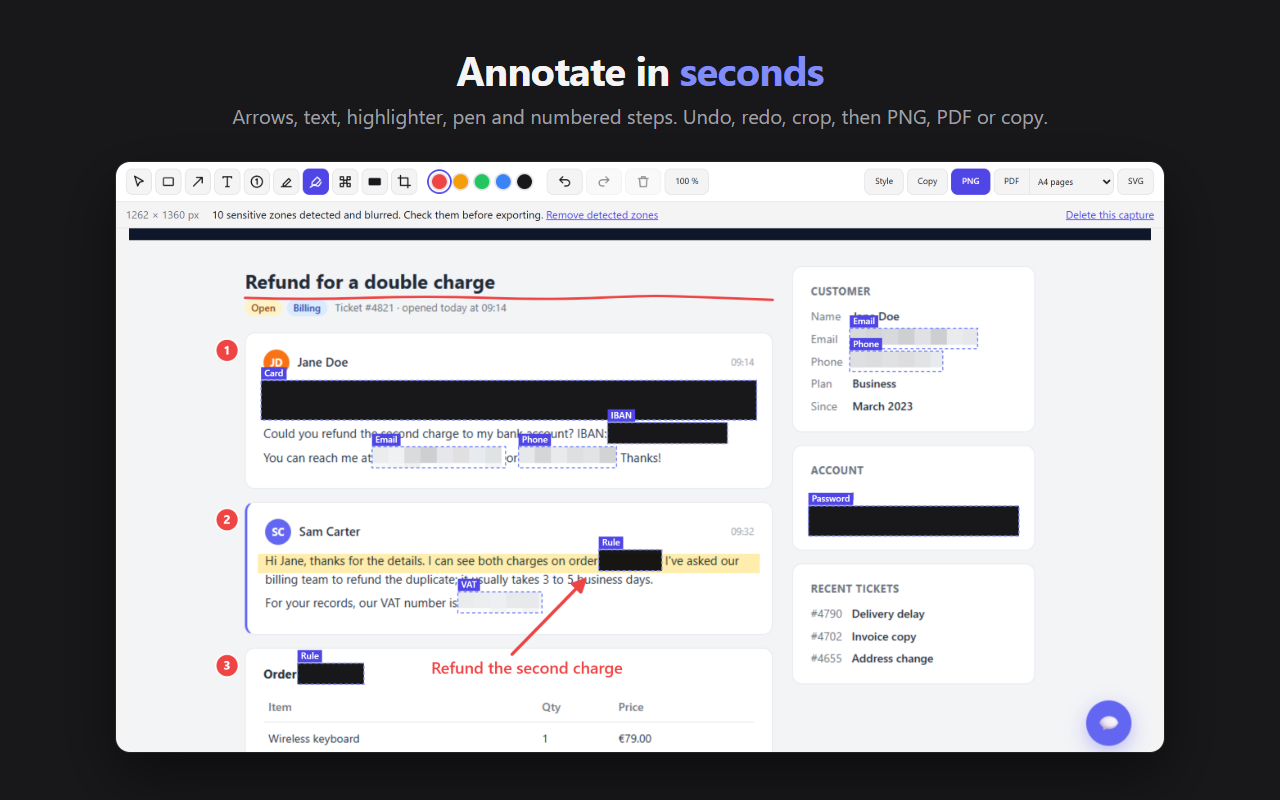
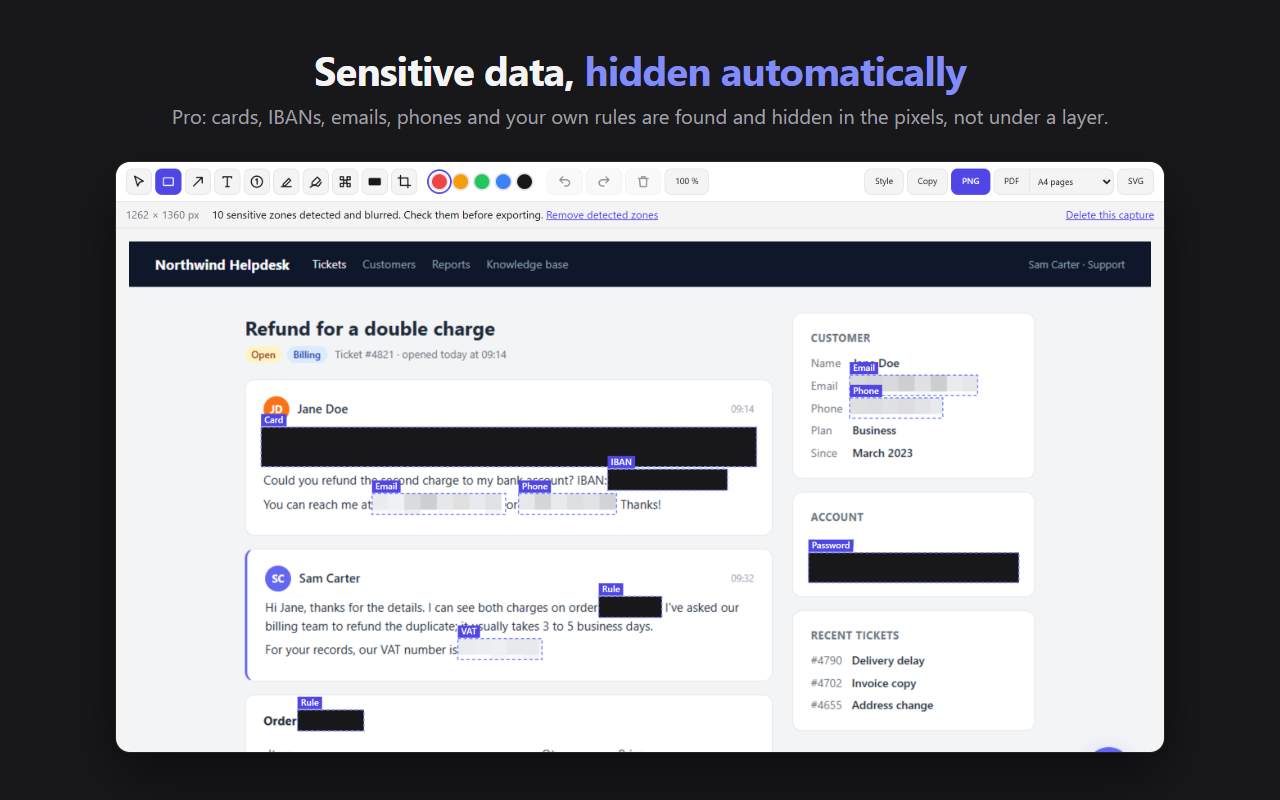
The Snapveil editor: card, IBAN, emails, phone numbers, VAT and password found and hidden, each area with its label

Features

Capture, annotate, hide, share

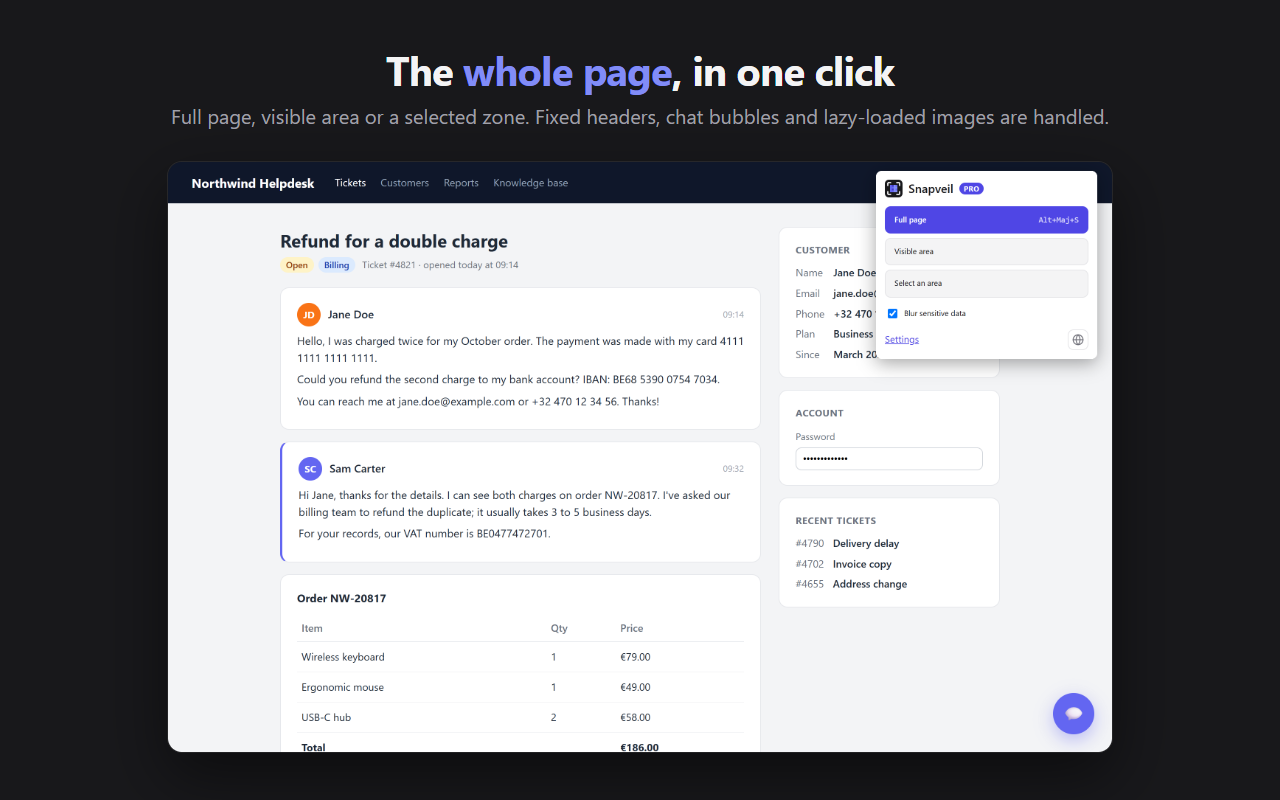
The whole page, in one click

  • Full page with automatic scrolling, visible area or a selected zone
  • From the toolbar icon, the right-click menu or a keyboard shortcut (Alt+Shift+S for the full page)
  • Fixed headers, cookie banners and chat bubbles appear once; lazy-loaded images are loaded before they're captured
  • Works on web apps that scroll inside a panel (Gmail, Notion, helpdesks…)
  • Very long pages captured in pieces, up to 50,000 pixels high; your scroll position is restored afterwards
The Snapveil popup over a support page: full page, visible area, select an area and blur sensitive data

Annotate and hide

  • Rectangle, arrow, text, highlighter, pen and crop, in 5 colors
  • Blur (pixelate) or Mask (solid block) any area by hand, in the free version too
  • Undo, redo, move and recolor every annotation
  • Export to PNG, PDF (A4 pages or one long page) or copy to the clipboard; file names include the site and the date

Hidden areas are replaced in the image itself, never covered by a layer that could be removed: the text is no longer in the file.

An annotated screenshot: numbered steps, arrow, text, highlight and pen stroke

Smart blurPRO

Card numbers (Luhn check), IBANs, VAT numbers, emails, phone numbers, password and card fields are found before the capture and hidden automatically. The areas follow the page if it moves while it's captured.

Each area has a label and can be removed or added in the editor. Always check them before exporting: detection can miss text inside an image, for example.

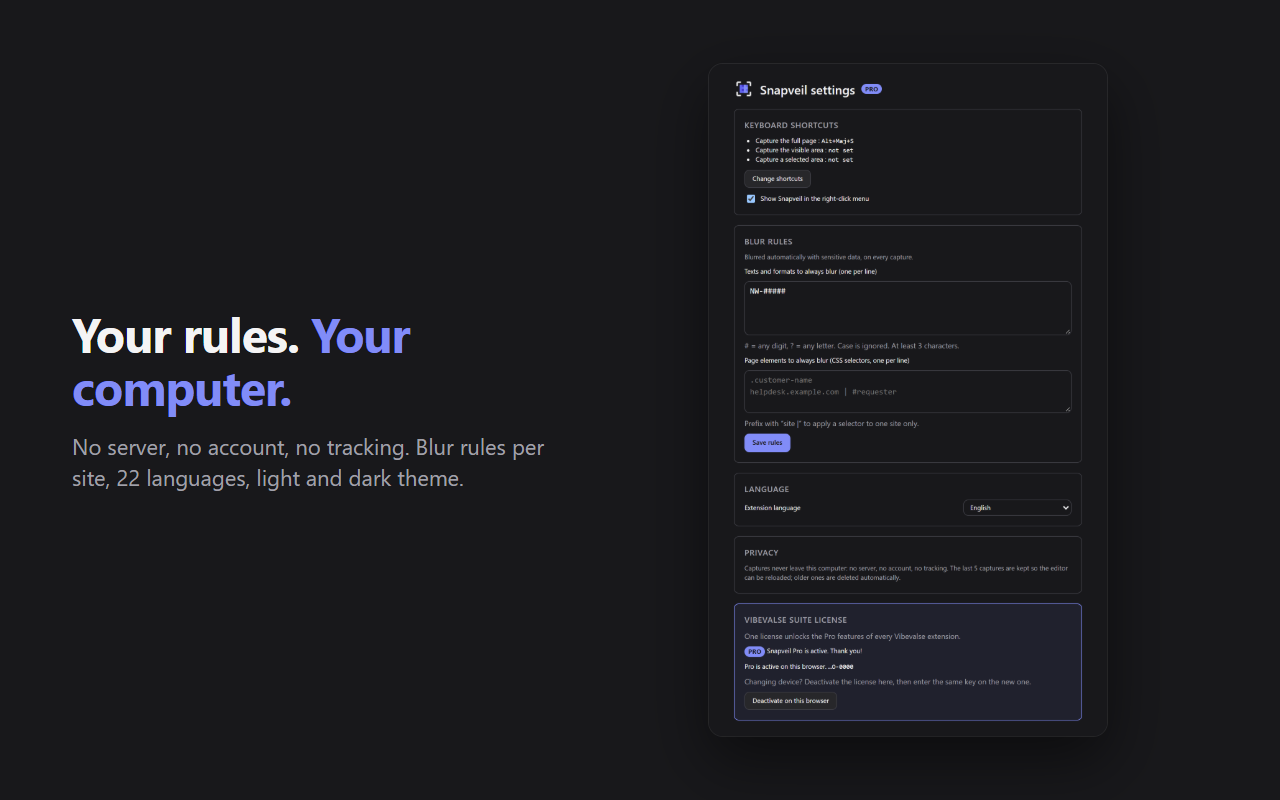
Your own blur rulesPRO

Customer names, file numbers like CL-###### or page elements, limited to one site if needed: they are hidden in every capture.

Snapveil settings in dark theme: shortcuts, blur rules, language, privacy and license

Ready to sharePRO

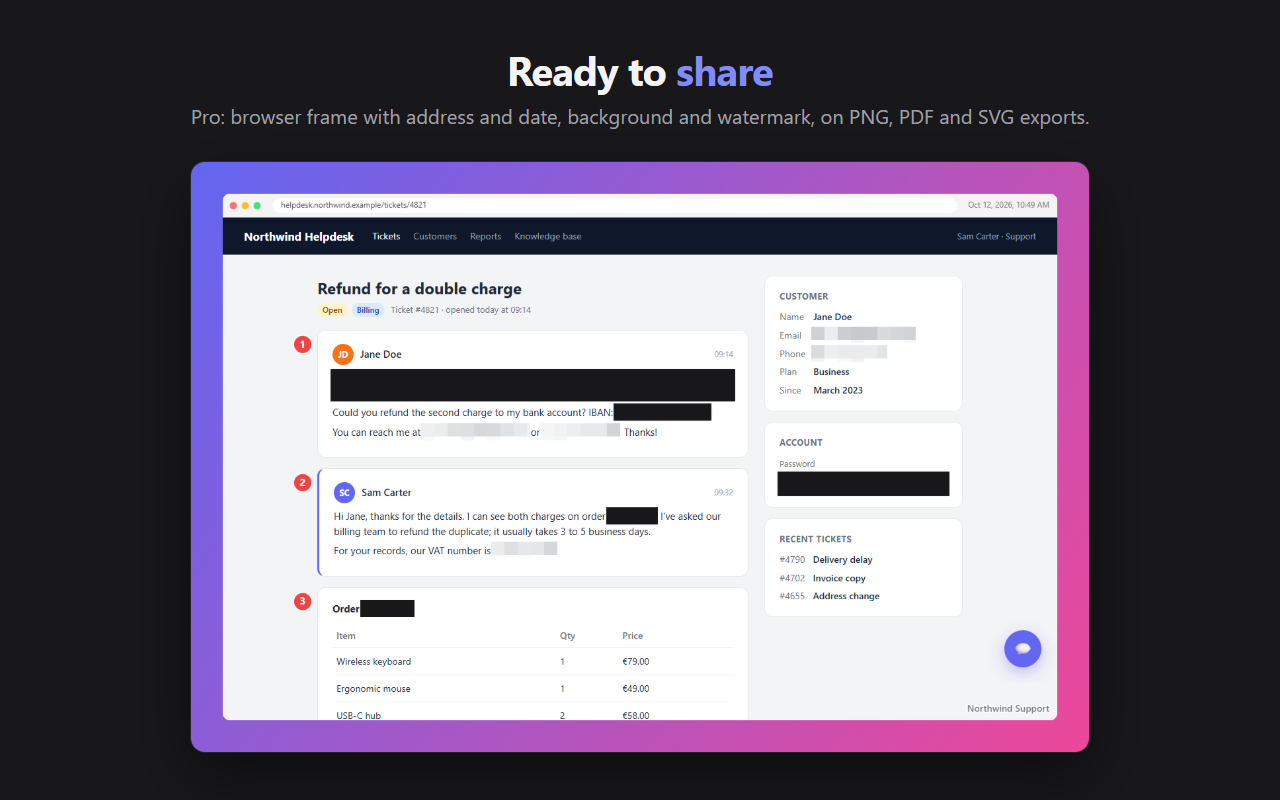
  • Export styling: browser frame with the address and date, background and watermark
  • Numbered steps for tutorials and support replies
  • SVG export with annotations you can edit in Figma, Illustrator or Inkscape

Light and dark themes, 22 languages.

A styled export: browser frame with the address and date, gradient background and watermark

Free and Pro

What Pro unlocks

FreePro
CaptureFull page, visible area, selectionFull page, visible area, selection
AnnotationsRectangle, arrow, text, highlighter, pen, cropRectangle, arrow, text, highlighter, pen, crop
Blur and mask by handYesYes
Smart blurNoCards, IBANs, VAT, emails, phone numbers, passwords
Custom blur rulesNoTexts, formats and page elements, per site
Numbered stepsNoYes
Export stylingNoBrowser frame, background, watermark
ExportsPNG, PDF, clipboard+ SVG
Capture limit, forced watermarkNoneNone

Pro is activated with your Vibevalse Suite license key, entered in Snapveil's settings. Changing devices? Deactivate the license in the settings, then enter the same key on the new one. The extension requires Chrome 120 or later.

Privacy

Your screenshots stay with you

  • Everything happens in your browser. Screenshots are made, edited and exported on your computer: nothing is sent to Vibevalse or anyone else. No account, no tracker, no ads.
  • No permanent access to your sites. Snapveil only reads the page you capture, when you ask.
  • The last 5 captures are kept on your computer, without the blur, so the editor can be reopened. “Delete this capture” removes one at once.
  • A single connection: checking the Pro license key with Polar, our payment provider, on activation and then once a week.
  • Mask or blur: the mask (solid block) keeps no information; the blur is very hard to undo, but not a mathematical guarantee.

Read Snapveil's privacy policy

Pro, and every other extension

The Vibevalse Suite unlocks Pro in Snapveil, in Modern EyeDropper, in FocusLock and in every extension of the Suite, today's and tomorrow's. One payment, refunded within 14 days if it's not for you.

See the Vibevalse Suite